
Third-Party Risk Dashboard for the Board: KPIs, Thresholds, Actions
Get third-party risk reporting to the board right, with 8-10 KPIs, red-yellow-green thresholds, and clear actions tied to owners and dates.


In third-party risk management, your vendors aren't just "suppliers" anymore. SaaS platforms, cloud hosts, payroll processors, call centers, and managed service providers can touch core systems and sensitive data. As a result, one weak third party can become your cybersecurity incident, your outage, or your headline.
Still, you don't need a thicker vendor spreadsheet in the board of directors packet. You need a clear view of exposure, decision points, and what management will do next. In other words, you need reporting that connects supplier risk to revenue, uptime, legal duty, and customer trust.
This article gives you a simple board dashboard approach: a tight set of KPIs, clear red-yellow-green thresholds, and a practical action playbook. You'll be able to make decisions fast, without getting pulled into technical noise.
Key takeaways you can use in your next board meeting
Have board members use the TPRM dashboard to make decisions, not to review every vendor.
Report by vendor tier, so the board sees risk where it matters most.
Track 8 to 10 KPIs, with trends (improving, flat, getting worse).
Set red-yellow-green thresholds in advance, so meetings don't turn into arguments.
Tie every red KPI to an action, an owner, and a date.
Review quarterly at the full board, with monthly exception updates for a committee.
Anchor oversight and accountability in governance, not personality, using board-level cybersecurity governance practices.
Start with board decisions, then pick KPIs that answer them
A board dashboard is not an inventory report. It's a tool for strategic decision-making, like a financial dashboard. The point is to help you answer, "What are you asking us to approve, accept, or fund?"
When third-party risk is on the agenda, your most common decisions usually look like this:
You may need to approve a new high-risk vendor because the business wants speed, cost savings, or a capability you can't build. After due diligence, you need a small set of KPIs that tell you whether the vendor meets your minimum bar and what the residual risk is.
Sometimes you must accept residual risk within your risk appetite because remediation will take time, or the vendor is hard to replace. Then you need KPIs that show the size of the exposure, how long it will last, and whether it's shrinking.
At other times, you're deciding whether to fund remediation (internal work, vendor upgrades, contract changes, added monitoring). Here, you need KPIs that link spend to reduced exposure, not activity.
You might also have to pause a go-live or require contract changes if the vendor can't meet basic controls or incident notice expectations. In that moment, "How bad is it?" matters less than "What will break if we proceed?"
Finally, if concentration risk is high, you may need to require an alternate supplier or a tested fallback, so one provider failure does not halt operations.
Your KPIs should match those decisions. If a metric can't trigger a decision, it doesn't belong on the board dashboard.
Define your third-party risk tiers so the metrics stay focused
Tiering keeps you out of the "100 vendors, 100 stories" trap. A practical model for third-party relationships is easy to explain:
Tier 1: vendors that can stop critical activities or access sensitive data (customer data, financial data, regulated data, IP).
Tier 2: vendors that matter, but failure is painful, not catastrophic.
Tier 3: low-impact vendors (limited access, easy to replace, little downside).
Board reporting should show KPIs by tier, not a long list of vendor names. Names belong in a drill-down page, not the primary view. If you want a board-ready way to frame oversight questions, you can use prompts like those in board cyber governance advisor guidance.
Agree on what "good" looks like before you measure it
If you don't define "good," every metric becomes negotiable in the meeting. Agree on a target state and guardrails, especially for Tier 1 vendors.
For example, you can set minimum requirements like: assessed within the last 12 months, critical findings closed within a defined window, incident notification within a short time period, and contract language that allows audit evidence of internal controls (or a trusted attestation like SOC 2).
You don't need to debate frameworks in the boardroom. Still, aligning your expectations to something widely understood (NIST or ISO) gives management a clear bar and gives you consistency across vendors. For more on setting executive expectations that scale, see establishing CISO standards for business growth.
The dashboard KPIs that boards actually use (and how to phrase them)
The best board dashboards fit on one page, with a second page for drill-down. Keep the phrasing business-first, and keep the trends visible. Also, avoid "busy" metrics that reward motion.
Below is a tight set of KPIs that tend to work for oversight of third-party relationships. Use 8 to 10, and stick with them long enough to see drift over time. This is what strong third-party risk management reporting to the board looks like when it's designed for decisions.
Exposure and resilience KPIs (what could hurt you next)
These KPIs focus on "What could break, and how fast can you recover?" through ongoing monitoring.
Tier 1 coverage, assessed and current (%): The percent of Tier 1 vendors with a current risk assessment. Trend should move up, then stay high.
Critical findings past due (count): The number of open critical vendor findings, including technical vulnerabilities, past the agreed SLA. Trend should move down.
Concentration risk for critical workflows (count): How many key processes depend on one provider (for example, one cloud, one payment processor). Trend should move down or stay stable with tested fallbacks.
Fourth-party dependency flagged (count): The number of Tier 1 vendors that rely on a subprocessor that creates meaningful exposure. Trend should stay low, but visibility should improve.
Tested fallback for critical workflows (%): The percent of critical workflows with a tested workaround (manual process, alternate provider, queued orders). Trend should move up.
Offboarding access removal on time (%): Whether you remove vendor access within your target window when contracts end or roles change. Trend should move up, then stay high.
If you want help keeping these metrics tied to business impact (uptime, trust, cost), use a model like measuring security's business impact.
Control and compliance KPIs (proof you have basics covered)
These KPIs are "table stakes," but they are not checkboxes if you pair them with action and enforcement to strengthen your security posture.
Security clause coverage for Tier 1 contracts (%): Contracts that include incident notice timing, audit evidence, subprocessor controls, and right-to-terminate for cause. Trend should move up.
MFA and logging requirements met for Tier 1 (%): Vendors meeting your minimum access controls and logging expectations for integrations and admin access. Trend should move up.
Incident notification commitment met (%): Tier 1 contracts that require prompt notice, plus evidence the vendor can actually reach you fast. Trend should move up.
Data handling confirmed for Tier 1 (%): Confirmed data location, retention, deletion, and encryption expectations. Trend should move up.
Attestation coverage (%): The percent of Tier 1 vendors with current SOC 2, ISO, or equivalent evidence like security ratings, where it fits the service. Trend should move up.
Exceptions, and their age (count, days): The number of approved exceptions to your vendor standards, and how long they've been open. Trend should move down.
The trap is treating compliance as comfort. If you want a clean way to keep evidence meaningful, not performative, see from compliance to confidence.
Set thresholds that trigger action, not debate
If your board meeting turns into "Is this bad?" you already lost time. Thresholds should be set before the meeting, so directors can focus on choices.
Use two types of thresholds:
Absolute thresholds tell you when something is unacceptable right now (for example, critical findings past SLA, or missing incident notice language in Tier 1 contracts for data breach reporting to ensure regulatory compliance).
Trend thresholds tell you when operational risk is drifting, even if today's number still looks "fine" (for example, two straight quarters of declining Tier 1 assessment coverage).
Here's a simple example you can adapt:
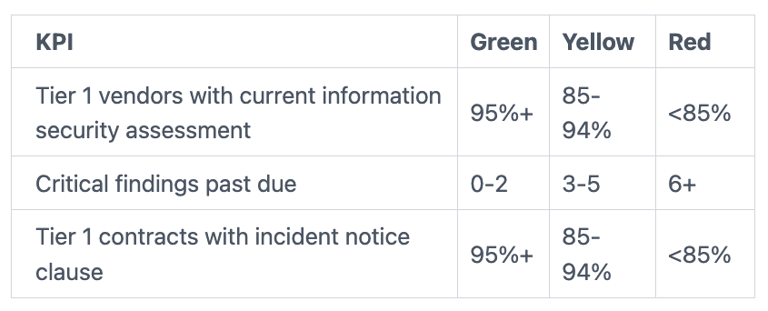
In the first 90 days, calibrate thresholds based on reality. Set a baseline, run one reporting cycle, then tighten the bar. Your goal is steady pressure, not instant perfection.
Use "decision thresholds" for the board and "work thresholds" for management
Management needs more detail to run the program day to day. The board needs fewer triggers that map to approvals and risk acceptance.
Board-level triggers might include: pause onboarding a Tier 1 vendor, require a contract addendum, require a dated remediation plan, approve risk acceptance with an expiry date, or require an alternate supplier plan.
To keep cadence clear across committees, align this with your board reporting rhythm. A useful reference point is risk committee cybersecurity reporting.
Don't hide the gray areas: document assumptions and confidence levels
Some numbers are precise. Others are estimates because vendors refuse assessments, data is incomplete, or you inherited suppliers through acquisition.
Instead of hiding that uncertainty, label it. Add a simple confidence mark (high, medium, low) next to a KPI when scope or data quality is shaky. Then require management to state the assumption in one sentence.
This approach also helps when a vendor changes fast (new subprocessor, new region, new ownership). You're not trying to shame the team for imperfect visibility. You're making uncertainty explicit, so decisions stay defensible. If you want better board conversations when facts are still forming, use guidance like leading cyber conversations to inspire confidence.
Turn red and yellow signals into a simple action playbook
A dashboard without an action playbook becomes theater. Every red or yellow signal should drive a consistent response for risk mitigation, so vendor risk doesn't get handled based on who complains loudest.
Your board-level playbook can stay simple:
When a KPI goes yellow, ask for a remediation plan, an owner, and a date. When a KPI goes red, ask what the business will do differently this quarter, not just what the security team will "work on."
Standard actions you can require include: time-bound remediation plans, compensating controls, integration limits, tighter monitoring, contract changes, independent validation, vendor replacement planning, or time-limited risk acceptance.
What to do when a critical vendor is not meeting your bar
Start by requiring a dated remediation plan with milestones, not a vague promise. Next, push for compensating controls while fixes happen (reduced permissions, network restrictions, added monitoring).
If data sharing is broader than needed, require data minimization or restricted fields. If integrations are deep, require reduced integrations until the vendor meets your baseline.
When trust is low, require an independent risk assessment at the vendor's cost, or at least evidence that maps to your control expectations. If the vendor can't or won't meet the bar, move to a replacement plan to ensure business continuity, or approve risk acceptance with an expiry date. Use contract negotiation to enforce required contract changes.
Vendor-driven incidents also need oversight readiness to support supply chain security, especially around notice, forensics access, and communications. Use a framework like board incident response oversight to keep decision rights clear.
How to show progress without drowning the board in detail
A simple rhythm keeps you informed without bloating the board pack:
Quarterly, present the one-page dashboard (plus a one-page drill-down). Monthly, send an exceptions update with ongoing monitoring to the audit or risk committee. For major vendor incidents, use a fast update path within days, not weeks.
If you include charts, keep it to three: a trend line (quarterly), a tier breakdown (Tier 1, 2, 3), and "top drivers" (what is causing red and yellow). Then tie that to leadership accountability using board oversight and CISO performance metrics.
FAQs boards ask about third-party risk dashboards
How many KPIs is too many?
More than 10 usually blurs decisions. Keep it tight, then add drill-down pages.
How often should you update the dashboard?
Quarterly for the full board aligns well with the risk management lifecycle. Use monthly exception updates for a committee.
Do you need a third-party risk tool?
Not always. For effective vendor risk management, start with defined tiers, consistent questions, and a repeatable report.
What about fourth parties?
Track them where they create real exposure. Focus on Tier 1 vendor subprocessors first.
What if a vendor won't share security info?
Treat it as a risk signal. Require contract language, alternate evidence, or an exit plan.
How do you handle M&A inherited vendors?
Put them in a temporary tier, label confidence as low, and set a 90-day risk assessment deadline.
What should the audit or risk committee own?
They should own exceptions, evidence sampling, and follow-through. To sharpen committee questions, use audit committee cyber risk questions.
How do you tie this to budget?
Fund actions that reduce red exposure (fallbacks, contract fixes, monitoring), not vanity work.
Conclusion
When vendors touch core systems and data, your risk boundary moves outside your walls. The board's job is to keep that reality governable. You do that by starting with decisions, choosing a small KPI set, setting thresholds that trigger action, and using a repeatable TPRM playbook for red and yellow signals.
In the next 30 days, you can make this real: define vendor tiers, select 8 KPIs, draft red-yellow-green thresholds, and run a trial report for one quarter in third-party risk management. You'll quickly see where data is weak and where exposure is real.
If you want help building board-ready reporting and governance that directors can use under pressure, with executive-level reporting as the primary benefit of the dashboard approach, start with a cybersecurity board advisor. Your next board discussion can be shorter, calmer, and far more decisive.
Tyson Martin is the executive public and pre-IPO companies in financial services, AI/data, SaaS, and cloud hire to make trust a measurable asset, one accountable answer to Is it secure? Is it resilient? Is the AI governed?
© 2026. All rights reserved.
Navigation
Free Resources
Contact

Stay ahead of your next board agenda
Sign up for Reports & Learnings From the Boardroom. Plain-English AI and cyber governance insights, biweekly. No pitch.
No spam. Unsubscribe anytime. · Or download the Director's AI Question Pack — 25 questions free